Quanta Systems

SuperpositionIn alpha

Your studio plug-ins.
Built for live sound.

Bring the VST3 plug-ins you trust in the studio straight to FOH and monitors — on a Mac or Linux computer, using your existing audio interface. Fast to navigate mid-show, easy to recall song by song, and built so a single bad plug-in never takes down the room.

Alpha · macOS & Linux (with Windows VST3 support) · Open source

OverviewSummer set
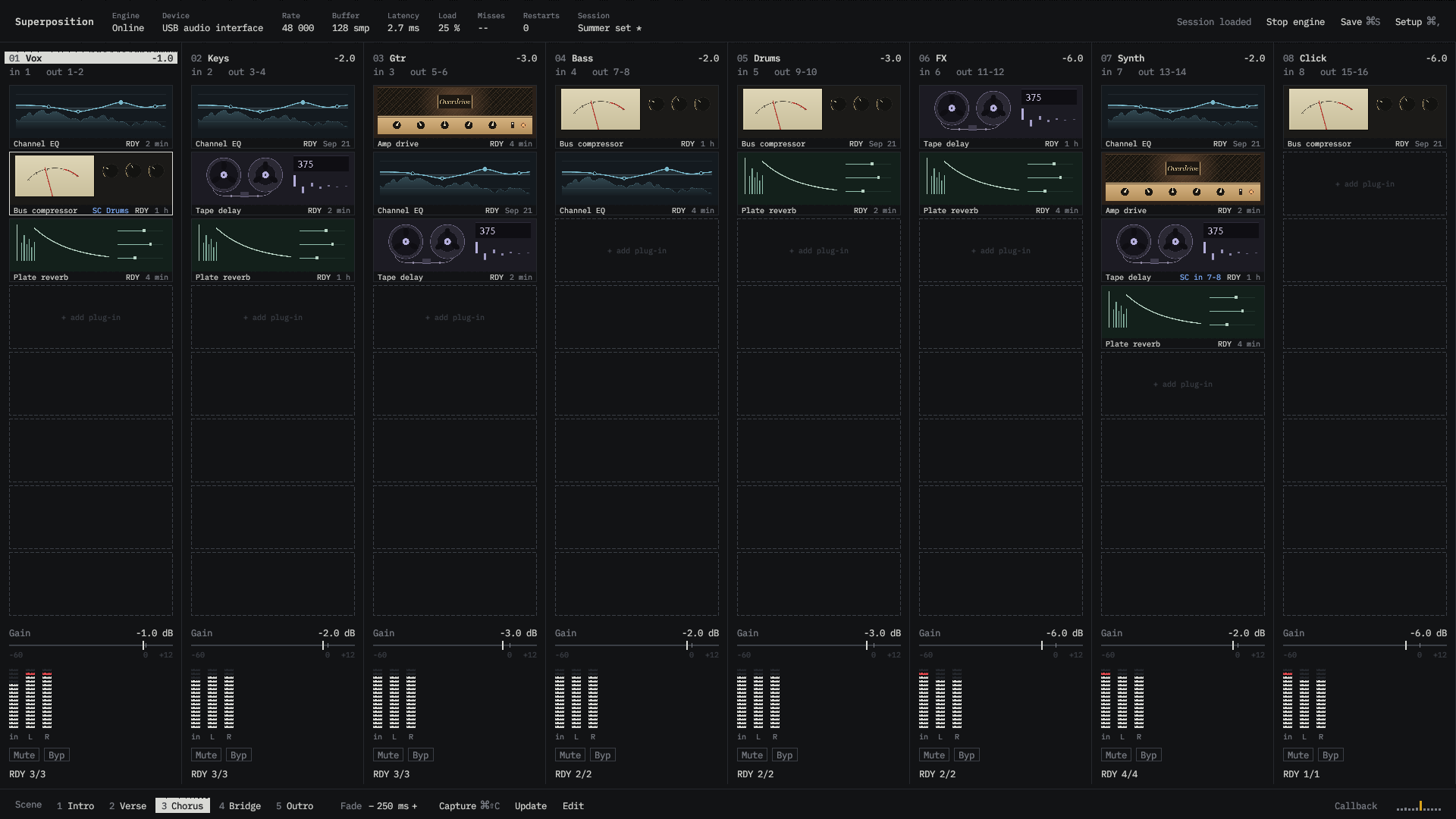
Superposition overview screen showing eight racks with the Chorus scene active.
Chorus scene selected. All 8 racks open.
64 racks
Up to 8 VST3 plug-ins per rack, organised across 16 pages
12 hot plug-ins
Pin your key processors for instant access from anywhere
Scenes & MIDI
Recall up to 256 parameters per cue with smooth fades
Rack isolation
If a plug-in crashes, the rest of the band keeps playing

01Live workflow

Built for speed when the room is full.

Designed like a live instrument, not a DAW. Keep your entire show visible in Overview, open a rack's full chain and editor in Rack view, and pin your most-used plug-ins so they stay one click away all night.

Direct console inserts

Straight to your desk. No hidden master bus.

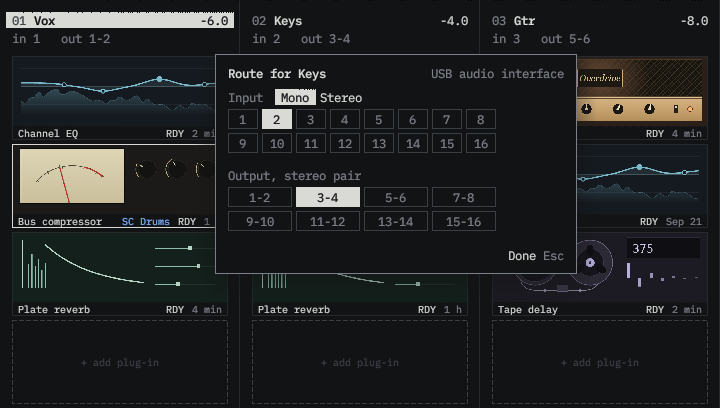
Patch any mono or stereo channel through up to eight plug-ins and send each stereo pair straight back to your console or interface. Pull sidechains from stage inputs or other racks, and re-patch between songs without stopping audio.

Superposition route popover for the Keys rack, with mono input 2 and stereo outputs 3–4 selected.Route popover · Keys rack · Mono In 2 → Stereo Out 3–4

Any interface · Low latency

No dedicated DSP server required.

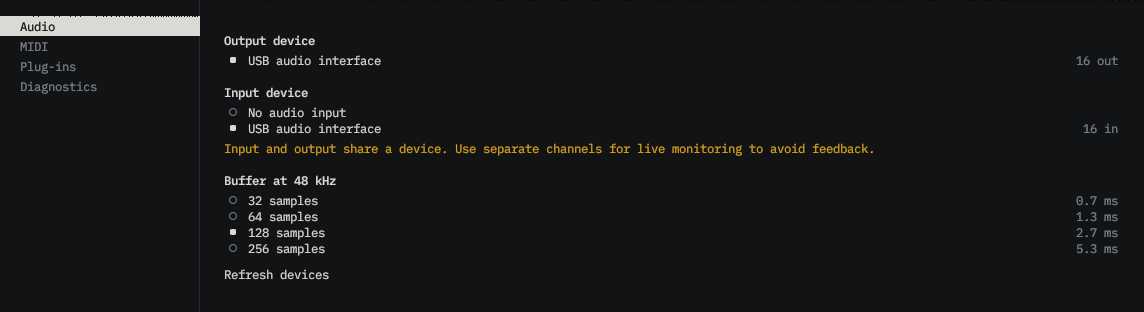
Use your existing audio interface at 48 or 96 kHz with buffer sizes down to 0.7 ms, and pair separate input and output devices whenever a rig calls for it. If an interface gets unplugged during soundcheck, Superposition reconnects automatically as soon as it returns.

Superposition audio setup showing independent input and output devices, 48 and 96 kHz sample rates, and four buffer sizes.Setup → Audio · Independent I/O · 48 / 96 kHz

Overview, Rack view & Hot plug-ins

Watch levels, routes, and live editor previews across up to 16 pages in Overview, then switch to Rack view for a dedicated editor workspace. Pin up to 12 Hot plug-ins so your lead vocal, bus comp, or delay is always on screen.

  • Overview
  • Rack view
  • 12 hot plug-ins

Song-by-song scenes & MIDI control

Save plug-in settings, rack levels, mutes, and bypasses into scenes and fire them from keys 1–8 or MIDI Program Change with smooth fade transitions. Map any MIDI fader or encoder to a plug-in control in seconds with MIDI Learn.

  • 256 params / scene
  • Smooth fades
  • MIDI Learn

Live edits & remote FOH control

Add, reorder, bypass, or save plug-ins while the band is playing with zero clicks or timing shifts. Keep the computer in your stage rack and control the entire show — plug-in editors included — from FOH over the network.

  • Dropout-free edits
  • Live save
  • Remote FOH

02Show reliability

One bad plug-in never stops the show.

Using third-party plug-ins live shouldn't mean risking the whole PA. Superposition keeps every rack separate from the audio engine and from every other rack. If a plug-in crashes mid-set, only that rack is affected: it restarts automatically while the rest of the band keeps playing — and passes clean dry audio if recovery fails.

Rack protectionEach rack runs in isolation48 kHz128 smp2.7 msRestarts 0
InputsAudio engineRacks · click any plug-in to test a crashOutputs

Audio engine

Online
Rate
48 kHz
Buffer
128 smp
Latency
2.7 ms
Dropouts
0
Restarts
0
Racks up
4 / 4

Keeps your show audio moving. Third-party plug-ins never run inside the engine.

In 1
Ready
Out 1-2
In 2
Ready
Out 3-4
In 3-4
Ready
Out 5-6
In 5
Ready
Out 7-8

Click any plug-in below to simulate a crash and see how the rest of the show stays live.

03Alpha releaseFree · Open source

Try Superposition on your rig.

Superposition is open source and running live shows in alpha today on Apple Silicon Macs and Linux — including Windows VST3 plug-ins on Linux. Download the latest alpha build to test it with your console and plug-in collection.

Available for macOS and Linux. Notarised macOS bundles and extended hardware testing are still in progress.

macOS
macOS 14.4 or later on Apple Silicon (48 kHz)
Linux
x86_64 with JACK or PipeWire (48 / 96 kHz), AppImage, tarball & NixOS
Plug-ins
VST3 — native macOS, native Linux, and Windows VST3 on Linux
Capacity
Up to 64 racks, 8 plug-ins per rack, 16 pages, 12 hot plug-ins, 1–64 channels
Control
Desktop app, remote FOH pairing, MIDI Learn & Program Change, headless mode
Licence
Free and open source (Apache 2.0 / MIT)
LambdaIn development

A full live console, on a single PC.

Lambda brings the same plug-in rack workflow into a 128-channel live mixing console on one compact Linux PC — combining 25 built-in studio effects, network stage boxes, and multi-screen control for FOH and monitors.

128 channels
Full FOH and monitor mixing over the network
25 FX + VST3
Built-in studio processing plus your own plug-ins
< 2 ms
Low-latency feel through a plug-in rack
Multi-screen
Mix from desktop, browser, MIDI wings & OSC

Quanta Systems

In control. By design.

Live audio tools built for the people behind the desk.

Running a live show shouldn't mean choosing between brittle studio software and locked-in hardware. Quanta Systems designs clear, dependable tools that give engineers full control over their sound without getting in the way when the lights go down.